New Feature: Multiple Neighborhood Support

Believe it or not, many of our users need access to more than one neighborhood website. Like who, you ask?

  1. Landlords who live in one neighborhood but have rental properties in another
  2. Property managers who live in one neighborhood and manage 10 more.
  3. Developers who want to keep tabs on all their neighborhood developments.
  4. People with multiple homes, like a vacation home.
  5. Government officials like city council members who want guest access to the neighborhoods in their ward.
  6. Police officers who want to publish bulletins to specific neighborhoods within their districts.

I’m sure there are more examples, but we run into it more than you might think. And now, I am pleased to announce that you can manage all of your neighborhoods from a new page called “My Neighborhoods” with one account.

My Neighborhoods serves two basic purposes: (1) it allows you to navigate or toggle between the various neighborhoods that you have access to and (2) it allows you to manage the settings for each neighborhood. You can also search for new neighborhoods to join from this page. Like the other features that I’m announcing today, this will be available on Friday, November 13th.

(NOTE to current users: If you are currently maintaining multiple accounts and you want to merge them, send an email to support@eneighbors.com with the email addresses that you use to access your accounts and we will merge them for you.)

Screenshot of new “My Neighborhoods” page is below:

My Neighborhoods (eNeighbors)

Upgrade: New Registration Process Explained

The current registration process for eNeighbors aims to limit access to our neighborhood sites to residents only. This ensures that your neighborhood website is kept private and secure and you can share information freely, without being concerned that the “whole world” will see it.

To accomplish this we currently assign 4 digit PINs or Personal Identification Numbers to each resident and street address in your neighborhood. Then, we send this number to all residents in the mail. When you attempt to register on eNeighbors, you are asked to enter both your last name and PIN, which is then associated with your street address. If the combination of your last name and PIN is correct, you are allowed to register. This process works perfectly at limiting access to residents; however, there are two issues: (1) it places a burden on property managers to keep their database of new residents current with us and (2) it makes it difficult to register for users who don’t have their PIN readily available.

To alleviate these two problems while still maintaining our ability to limit access to residents only, we are removing the last name requirement so property managers don’t have to send us new resident notifications and we are allowing users to register using their street address if they do not have their PIN readily available.

As a result of these changes, a new role has been created called the “Gatekeeper”. The Gatekeeper can be any resident, board member or property manager who will approve access requests for residents registering by using their street address instead of their PIN. If no gatekeeper is identified, the request will be routed to eNeighbors for review.

These changes to the registration process will be in place after Friday, November 13th, 2009.

As always, if you have any questions, send an email to us at support [at] eneighbors [dot] com or leave a comment below.

New Design (Sneak Peek)

We are working hard to launch a new design for eNeighbors.com and plan to launch on Friday, November 13th.

IMPORTANT! If you are a board member or property manager, please do not send out any new registration mailings (PIN letters) until after the upgrade is complete as we are making some changes to the registration process.

Now for the sneak peek…

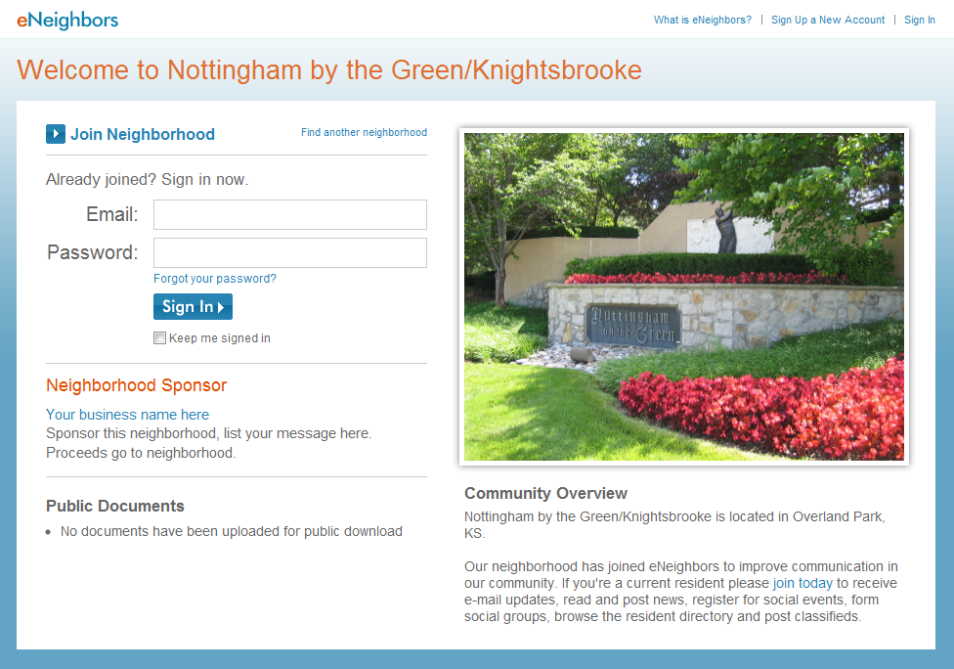
Below is a screenshot of the new design for the public neighborhood sign in page set to launch next week:

eNeighbors Public Neighborhood Page

Below is a screenshot of the current design:

eNeighbors Current Public Neighborhood Page

LionsGate Neighborhood Survey Results

The LionsGate Homeowners Association Board of Directors recently asked their residents to complete an online survey to help them to better understand what their residents are thinking. LionsGate is a community of nearly 600 homes in Overland Park, Kansas, 500 of which are registered on their eNeighbors website. The survey was distributed via eNeighbors and they received 296 responses.

From Mark Spraetz, LionsGate Board President:

“Suffice to say, we were very pleased by the level of response. Most surveys, on line or otherwise, generate a marginal response rate so achieving a 50%+ level shows a high level of on-line engagement within our community. There are many survey tools on the web that are very affordable and will generate a link that you can publicize easily with a “bulletin announcement” via your website service. We tried a variety of questioning formats and learned that some worked better than others so future surveys can yield even better results. There was an open ended option so residents gave us free-form feedback on a couple issues that we did not include [for a variety of reasons] when we published the results but many of those comments gave great perspective, too. I would encourage any Board looking to poll their community to think about this approach; easy and affordable and the tabulation and reporting was all handled by the survey service…just had to log in…”

If you are a board member on your HOA you will find the survey results interesting and perhaps even helpful.

Download full survey results (PDF)

Be the Match today (September 1st, 2009)

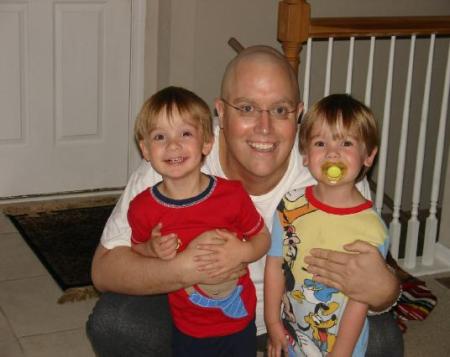
Brad Woodwoth with twin 3 year old boysBrad Woodworth, father of twin 3 year old boys, was diagnosed with Acute Myelogenous Leukemia (AML) on April 13, 2009. Brad’s doctors want him to now have the life saving Bone Marrow Transplant. We only want to find a match for Brad, but also to educate the public on the easy registering and the painless donor experience. Please take time to register and be one step closer to saving a life.

Be the Match Registry is a national registry of bone marrow donors. When someone is in need of a bone marrow transplant, they turn to this registry to find a matching donor.

They are holding a registration event today for donors in Leawood, Kansas at the Church of the Resurrection from 8am to 8pm.

Church of the Resurrection
13720 Roe  Boulevard
Leawood, Kansas 66224

To join, you only need to be between the ages of 18 and 60, be willing to donate to any patient in need, and meet the health guidelines.

*This information was originally posted on the Nottingham Forest South neighborhood website by Larry and Pat Woodworth.

Neighborhood Watch and Social Networking

From TechNewsWorld: Neighborhood Watch 2.0:

City budgets are straining police forces in many cities, and in some cases citizens have seized upon social networking technologies to help guard against crime in their own neighborhoods. It’s unclear whether neighborhood watch efforts actually make people safer, but statistics indicate that neighborhoods with high levels of resident cohesion typically have less crime.

This is another example of how better communication (or cohesion) in a neighborhood can help make it safer.

eNeighbors Traffic Reports vs User Feedback

I monitor the traffic reports for our website (eNeighbors.com) at least once a day and get caught up in the upticks and downturns in traffic. The data that we can track is really helpful like pageviews and visits, which gives me a measure of the health of our site, but it lacks the intangible perspective that you get from user feedback.

In the case of South Village, they have 318 registered users on the website from 287 homes. This is good to know, but what does it mean? Can they communicate with these residents effectively? How can we test this?

One way to test this is to simply ask your users, which is exactly what a communications committee member in South Village did. He simply posted an article to see if “anyone was out there”. (An ingenious and completely tangible way to track usage and response.) I posted a screenshot of the article with the comment string below so you can see. In total, he received 86 comments, which is pretty impressive considering that there are only 318 registered users on the website. Anyone who blogs knows that this is a tremendous response rate.

I think the response was awesome and it gave me a great feeling that their website was so frequented. The comments help to give better insight into our user’s attitude and feelings about eNeighbors that you cannot get from traffic data. The comments also solidify our feelings that our automatic email newsletter and other notifications are working to promote traffic and usage.

Some of my favorite comments include:

  1. I try to log onto eNeighbors at least once a day when I can, because I want to know what my fellow homeowners are discussing. I don’t always respond to postings, as I am just one Board member and don’t represent the views of the Board as a whole. What I do is try to find out what topics are generating high levels of interest among homeowners so that, if necessary, we can include these topics in future meeting agendas.
  2. we read weekly and sometimes more! love this!
  3. We read it regularly. Thanks for taking the time to do it.
  4. Wouldn’t miss it for the world. 🙂
  5. Yup, we read them as soon as something is posted..
  6. We’re tuned in. Thanks.
  7. Hello – I look at this quite a bit – especially since I get the alerts regularly.
  8. I read this site whenever the email informs me of new posting. I set my account to receive email daily from EN.
  9. I look up eneighbors every day when I am home (I was out last two days).
    I do read all the postings and the comments that follow and make notes on them, but usually do not make any comments. (Any comments I make are my own and do not represent the Board’s views). I do believe that all Board Members do read the postings on eneighbors.
  10. I read when I see new things that I want to hear more about. (Get the reminder weekly.)


Is there anyone out there?

Censorship and social media

In April I posted an article about content moderation, a feature of our website that allows a board member to review information posted by residents before it is published on the website. In it, I recommend that board members do not utilize this feature and allow residents to freely communicate, so long as no one is violating the Terms of Use or the law.

As a follow up to that post, I would like to provide board members with an alternative to content moderation in this post.

The video below is titled “How social media can make history” and it is 15 minutes and 48 seconds long. If you don’t have time to watch the whole thing, scroll forward to 12:27 into the video for the relevant part where Clay Shirky shares a story about MyBo.com, the social networking site that the Obama Campaign established during his campaign and how Barack Obama responded when the registered users of the site were not too happy with him about reversing his decision on the Foreign Intelligence Surveilance Act. He didn’t shut the site down, he didn’t make it harder to register, he didn’t moderate the content. Instead, he simply told them why he decided what he did and let them use the service to talk about it. The speaker in the video concludes with this statement:

“They [the Obama Campaign] had understood that their role with myBo.com was to convene their supporters, but not to control their supporters. And that is the kind of discipline that it takes to make really mature use of this media.”

The alternative to moderation or censorship is to operate transparently and openly by communicating. Let your residents know what you’re doing and why you’re doing it.

A partial transcript is provided below between 12:27 and 14:30:

“We saw some of the most imaginative use of social media during the Obama campaign. And I don’t mean most imaginative use in politics. I mean most imaginative use ever. And one of the things Obama did, was they famously, the Obama campaign did, was they famously put up MyBarackObama.com, myBO.com. And millions of citizens rushed in to participate and to try and figure out how to help. An incredible conversation sprung up there. And then, this time last year, Obama announced that he was going to change his vote on FISA, The Foreign Intelligence Surveillance Act. He had said, in January, that he would not sign a bill that granted telecom immunity for possibly warrantless spying on American persons. By the summer, in the middle of the general campaign, he said, “I’ve thought about the issue more. I’ve changed my mind. I’m going to vote for this bill.” And many of his own supporters on his own site went very publicly berserk. It was Senator Obama when they created it. They changed the name later. Please get FISA right. Within a day so of this group being created it was the fastest growing group on myBO.com. Within weeks of its being created it was the largest group. Obama had to issue a press release. He had to issue a reply. And he said essentially, “I have considered the issue. I understand where you are coming from. But having considered it all, I’m still going to vote the way I’m going to vote. But I wanted to reach out to you and say, I understand that you disagree with me, and I’m going to take my lumps on this one.” This didn’t please anybody. But then a funny thing happened in the conversation. People in that group realized that Obama had never shut them down. Nobody in the Obama campaign had ever tried to hide the group or make it harder to join, to deny its existence, to delete it, to take it off the site. They had understood that their role with myBo.com was to convene their supporters, but not to control their supporters. And that is the kind of discipline that it takes to make really mature use of this media.”

Please comment with your thoughts below. What are the benefits of moderation? What are the costs? How do you operate your neighborhood website and why?

Gourmet Groups (I love email like this)

From Jason at Curry Association Management:

“Chris, my Wilshire Farms community has had tremendous success with their gourmet group.  So much so that they are wanting to break into 2…possibly 3 separate groups.

Is there a way to easily break one group into multiple groups?”

I have noticed that Gourmet Groups like the “Gourmet Gals” in Nottingham Forest South have taken off lately in several of our communities. If you haven’t started one in your neighborhood you may consider doing so.