Should you discontinue your neighborhood’s paper newsletter?

Our customers are considering this question more and more as they look to save money and communicate more efficiently.


In an effort to answer this question in her own neighborhood, one savvy board member decided to find out the best course of action and asked residents what they prefer – receiving a printed monthly newsletter in the mail or receiving news via email.


I have republished the article below so you can hear from real residents that currently use eNeighbors and also receive a paper newsletter. After reading the comment string, please let us know your thoughts by commenting below.


March – “Chime In”

This month’s “Chime In” asks:


Would you rather get your newsletter via email or do you prefer receiving your printed monthly newsletter in the mail? What do you like, or dislike, about receiving it by email? What do you like, or dislike, about receiving the printed version by mail?


Here’s your chance to give us your opinion, so “Chime In”.


Submitted by: Deb M. – Communications Manager  Date: 02.26.09 | 10:26 AM


I like receiving the newsletter in the mail as my preference is to read information in print vs. on the computer.


Submitted by: Robert & Michele B. Date: 02.26.09 | 9:13 PM    


Hands down, getting the newsletter by e-mail is just the best. Receiving notifications weekly, easily being able to contact board members/neighbors, plus the savings in paper waste and postage, makes e-mailing the newsletter the most efficient way of communication. Weekly exposure keeps our neighborhood “tuned in”.


Submitted by: Karen and Dale U.  Date: 03.02.09 | 3:30 AM    


I would rather get the newsletter via email. Saves paper/trees and should save the home association money.


Submitted by: Dale R. Date: 03.02.09 | 5:49 AM    


I would prefer the newsletter via email, but how much revenue would we be losing from the ad space that is sold on the printed version?


Submitted by: Dave and Kim C. Date: 03.02.09 | 8:35 AM    


E-mail. Future is paperless. Money saved in printing & postage can be used in other areas plus you can always go back and retrieve past newsletters if need. Ads could still be sold and be displayed – just in electronic format.


Submitted by: Rob and Terrie D.  Date: 03.02.09 | 9:08 AM 


As a clarification, the advertising in the newsletter pays for all costs associated with the printed version…that includes production, printing & postage. So, in theory, there would be no savings of monies spent or earned that would be available for other expenditures by the homes association. However, several of you have made valid points regarding paper waste and retrieval of past issues. Although we might not be able to completely eliminate the printed version, we are looking at more effective means of delivering its contents. Thanks for the input!


Submitted by: Deb M. – Communications Manager  Date: 03.02.09 | 11:57 AM    


A personal note: I just was thinking about the beginnings of the newsletter. I was on the newsletter committee very early on. There were a few of us who would take turns doing the newsletter – Sometimes a very dreaded task. Different person, different formats. Delivery was by a volunteer on each block and hand delivered personally to each house, there were no addresses on them. It was truly an effort in neighborly-ness. Those on this committee were usually considered the ones to go to for any information, and it was frustrating when people wanted to locate past versions or who to call for renting the clubhouse, yard sale, etc. However, back to “modern times”, I applaud Deb M. with her efforts as the Communications Mgr. I still feel the electronic version is the way to go, but for those who want a printed version, maybe it could be sent on a less frequent schedule.


Submitted by: Karen and Dale U. Date: 03.03.09 | 1:18 AM    


Electronic would be great. I end up scanning over the paper one then throwing it in the recycling bin.


Submitted by: Brooke and Rich P. Date: 03.03.09 | 2:51 PM    


Thank you Karen & Dale, for your kind words. We will continue to find better ways and means to communicate…whether that be in print or electronic. Bring on SUMMER!!!!!!!!!!!


Submitted by: Deb M.  – Communications Manager  Date: 03.03.09 | 11:48 PM
Spruce Creek South: Retirement Community for Active Adults

When evaluating our product, neighborhoods that have an older demographic, like a retirement community, often express concern that their residents don’t have access to the Internet so they won’t use the neighborhood website.

My experience is that the age of a community is not an issue.

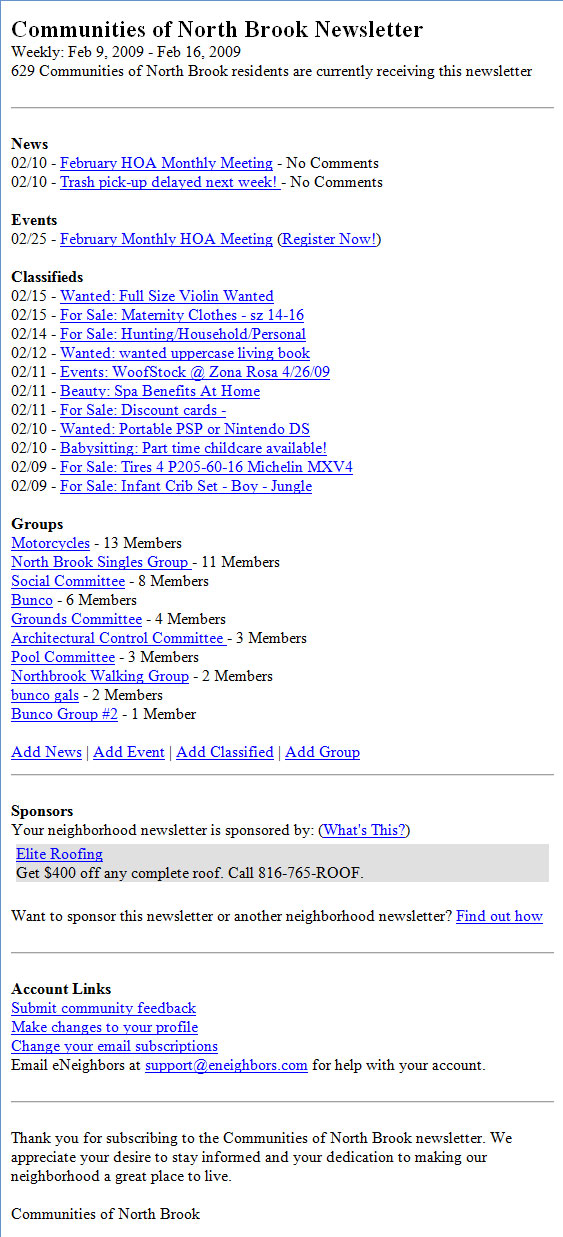
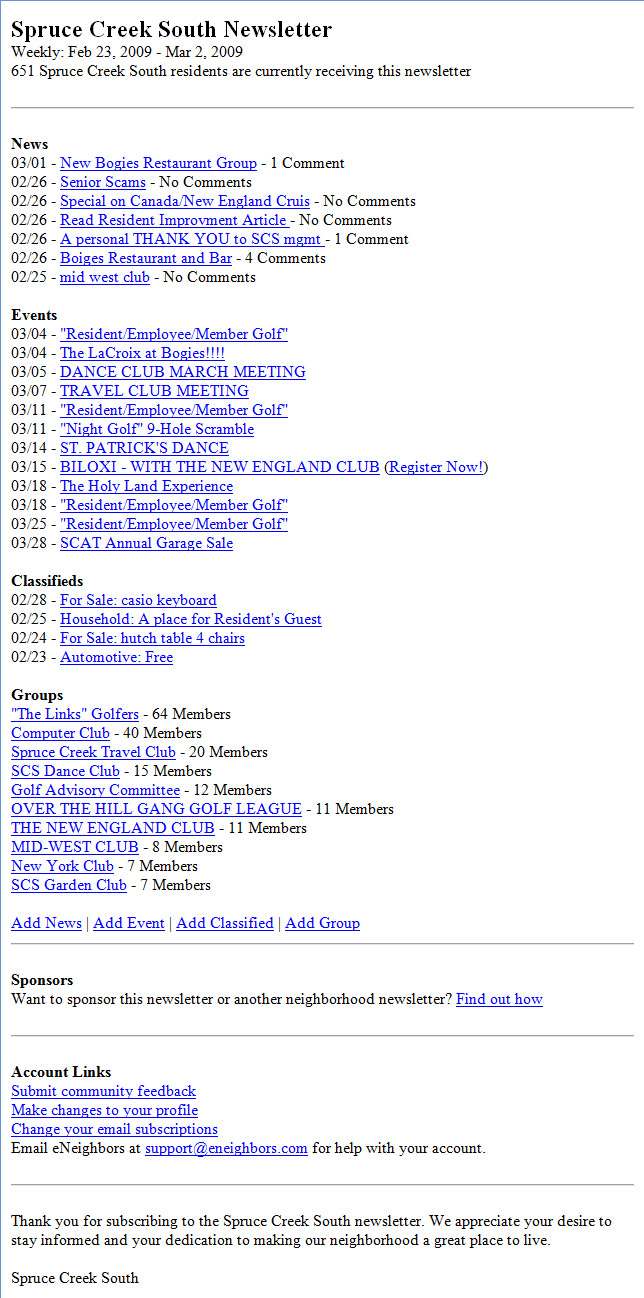
Case in point: Spruce Creek South is a retirement community in Florida. They currently have 651 residents that have registered for website access and subscribed to their email newsletter.

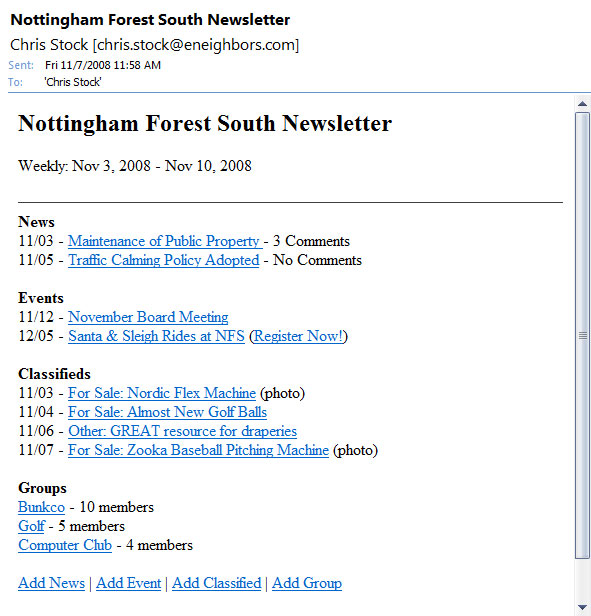
I have provided a screen shot of their email newsletter that was sent out today to give you an idea of the participation level in their community. My observation has been that older communities are very active, an in some cases, post more “Events” than any other neighborhoods that we have online.

sps-weekly_email_newsletter

UPDATE: According to the property management company for Spruce Creek South, the average age of a resident is 70 years old.

A new record: Monarch Hills reaches 98% registration rate

Monarch Hills is a community of 80 homes in Texas – 78 of those homes are now registered online for access to their private neighborhood website.

Registration to the website requires a unique PIN to join. This ensures that only residents are allowed access.

Recently, the Monarch Hills HOA President set a goal to get everyone in her community registered online. She sent me the following email last night:

“That leaves two people on this report. I’m very pleased – everyone is signed up except  these 2 households. [One] family do not speak English and do not wish to be on the system and the [other family] are an elderly couple and do not have a computer.  But all in all it has been great and we have really used eNeighbors alot lately with the conversion to our new gate access system.”

Other neighborhoods are close behind:

  • Wilshire Farms – 90% registered (159 homes )
  • Nottingham Forest South –  85% registered (585 homes)
  • LionsGate –  84% registered (592 homes)

Congratulations to Monarch Hills for reaching this incredible milestone.

More on our registration process is available at http://www.eneighbors.com/overview/how.html.

Product Update: Resources

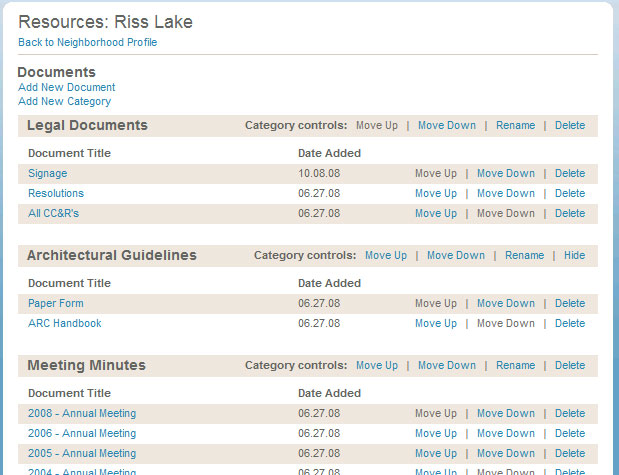
Last night we launched new functionality to the Resources page that will allow property managers, board members and other administrators to better organize the documents that are posted online under the “Resources” tab.

This update allows you to rename categories, remove categories that you don’t use, and move the sort order up or down as shown in the screenshot below:

Riss Lake Resources

Riss Lake Resources

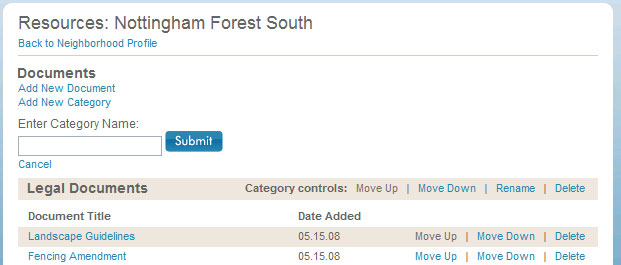
The screen shot below shows the add category functionality:

Add New Category

Below is an example of how to rename a category:

Rename

You can also rearrange documents that you have uploaded by using the “Move Up” or “Move Down” links.

Email your suggestions for future product updates to suggestionbox [at] eneighbors [dot] com.

Product Update: News Articles

I’m excited to announce that we just launched expanded functionality for news articles that allow greater control over how your content is presented.

Before today, you were limited to posting text-based news articles.

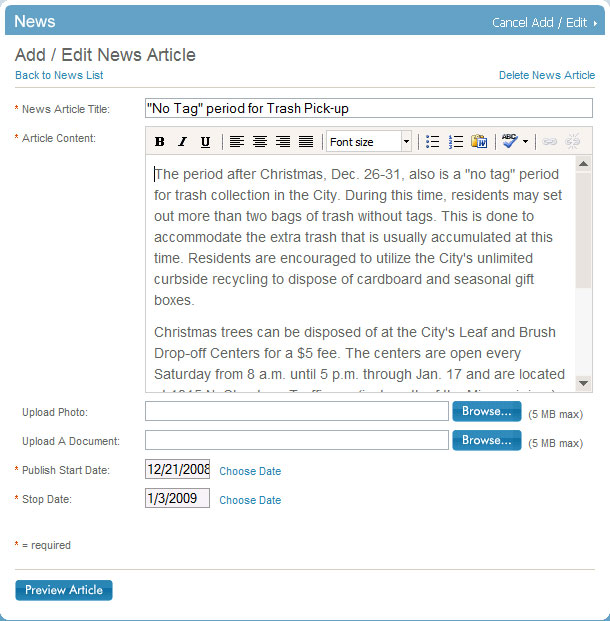
The next time that you post a news article you will see our new WYSIWYG (What You See Is What You Get) editor. This editor will allow you to do everything that you would expect including the ability to apply font treatments like bold and italics to your text. You can also align your text to the left, center, or right. Of course, you can adjust the font-size of your text, add bulleted or numbered lists, and insert hyperlinks. Best of all, we also added a spell checker.

In addition to the WYSIWYG editor, you can now upload documents and attach them to your news article. This can be helpful when you need to distribute information that you have in a PDF, DOC, XLS or PUB file. (Other file formats are also supported.) A screenshot of the new editor is below:

 WYSIWYG Editor

I want to give special thanks to a few heros at Level Five Solutions including Jenny Noone, Dustin Engelhaupt, Alex Martens, and Greg Stickley for getting this pushed out the weekend before Christmas.

eNeighbors for free?

Neighborhoods now have the opportunity to offset the cost of their website by selling the sponsorship position on their public sign in page.

If you have a sponsor interested in advertising on your website, simply email us at ads@eneighbors.com with the following:

  1. Advertiser Contact Information
  2. Headline – maximum 25 characters
  3. Description Line 1 – maximum 35 characters
  4. Description Line 2 – maximum 35 characters
  5. Website URL: maximum 1024 characters

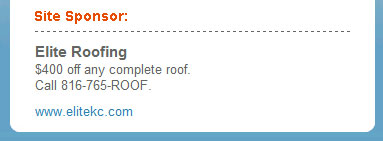
A sample ad is shown below:

Site Sponsor Example

For those neighborhoods that do not currently have a sponsor listed on your homepage, you may begin selling your space immediately. For those that currently have a sponsor listed, you will have to wait until the end of that sponsor’s current agreement before you can sell the position.

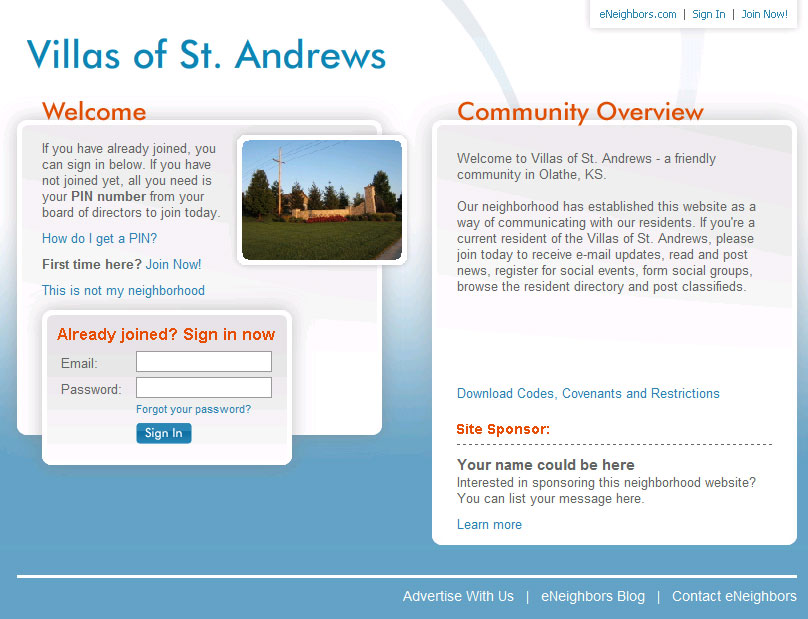
Below is an example of the sponsorship postion on the public sign in page:

Villas of St. Andrews

Product Update: Password Reset

Not being able to sign into a website can be one of the most frustrating experiences online, which is why we’ve improved our password reset process to be as quick and simple as possible.

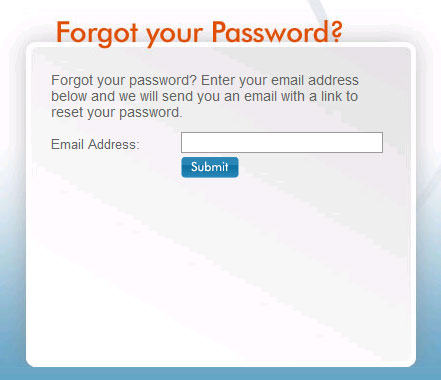
If you’re having trouble signing into your account, you can reset your password at http://www.eneighbors.com/forgotPassword.do. Simply enter your email address and we’ll send you an email with a link to reset your password. Click the link, enter a new password, enter it again to confirm and you’re done. We even automatically sign you in to your account after you reset your password to save you a few extra steps.

Here are a few other helpful tips if you’re still having trouble signing in:

  1. Make sure that you’re using the correct email address. Many times, you are entering the password correctly, but your email address isn’t correct.
  2. Make sure that caps lock is not on. I know, everybody knows this but it can still happen. I’ll admit I forget from time to time.
  3. When signing in, use your password and NOT your PIN. Your PIN is used to register new accounts associated with your street address. After your register, you will only use your password that you created.

If you’re still having trouble, don’t hesitate to email us at support@eneighbors.com for help.

Forgot Your Password?

Product Update: Email Your Neighbor

Emailing your neighbors got a little easier this morning.

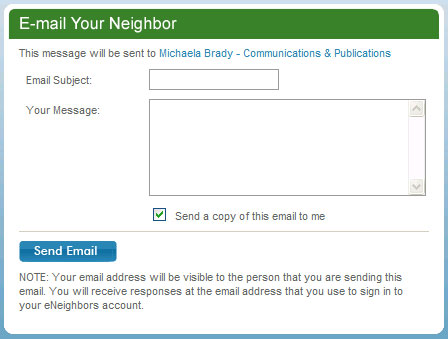
First, many residents have requested a way to save the messages that they send to their neighbors, so we’ve added the ability to email a copy of your message to yourself. In the screenshot below, you can see that there is a new checkbox called, “Send a copy of this email to me.” This is the default setting. If you don’t want a copy sent to you, simply uncheck the box.

Second, and more importantly, your email address will now be included in the email that you send to your neighbor so they can reply directly to you, without having to go back to the website.

And finally, we still do not display email addresses anywhere on the website in an effort to protect our users from SPAM and other unwanted email.

Email Your Neighbor