Wow, this is really amazing. If you want a free, robust online photo editing tool, check out www.photoshop.com.
Microsoft Word 2007: Save as PDF (Free Add-in)
I can’t believe I didn’t know this existed earlier. If you work with HOAs and Property Management companies you know that there is a ton of paper floating around. Getting it into PDF for easy sharing online can be hard. Many of you have to print it out and scan it in, which creates a large file that cannot be searched because it’s saved as an image instead of text. But now, you can convert your Word 2007 file into PDF right from Word with a free add-in from Microsoft. I tested it and it works!
Here’s the link to the add-in that you need for Word 2007: http://www.microsoft.com/downloads/details.aspx?familyid=4D951911-3E7E-4AE6-B059-A2E79ED87041&displaylang=en
It looks like there is NOT a similar conversion tool for earlier versions of Word (http://office.microsoft.com/en-us/word/HA011683331033.aspx). If you know of one, please post it in the comments.
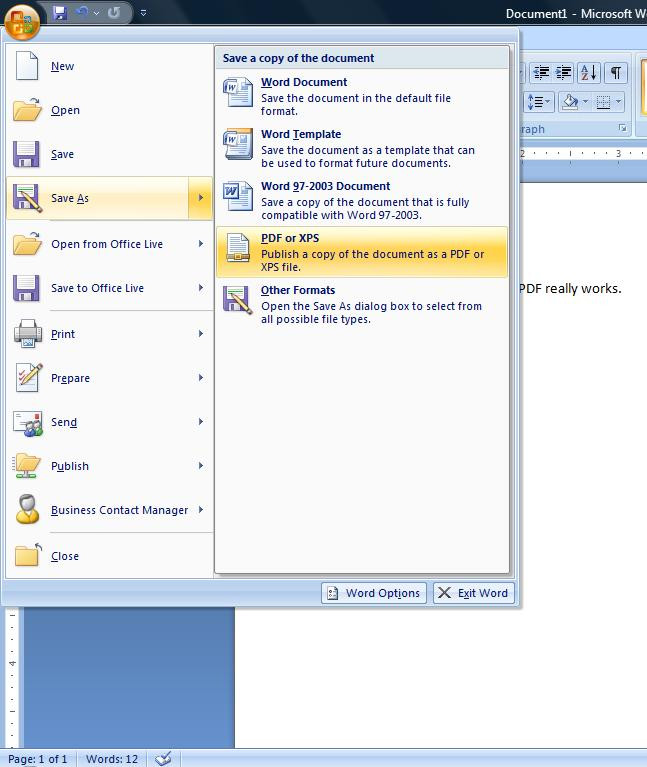
After your download the file and click “Run” it will automatically install. The process takes about 60 seconds. Then type your document and click “Save As”. You’ll see the new save as “PDF or XPS” option in the menu.
How to generate more participation on your neighborhood website
I’ve said it before and I’ll say it again – the best way to increase participation on your neighborhood website is to post information as frequently as possible.
Not only do you encourage other residents to post, but you encourage more residents to register.
As I was going through our website activity reports, I saw an increase in activity in Hampton Place so I started digging to find out why. It turns out that they have a new board member (Marc O’Leary) who recently took it upon himself to increase communication in their neighborhood.
Below is a traffic report that shows the difference Marc is making. Note the spikes in traffic over the last 30 days.
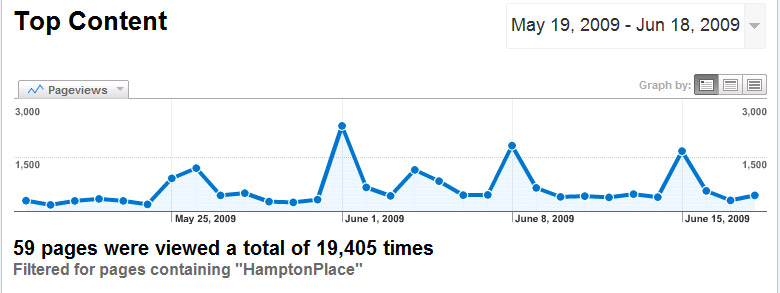
Not only is he posting more frequently, but he is posting relevant and useful information, and it prompted me to put together a list of Do’s and Don’ts to help other board members generate more participation in their own neighborhood.
Below is my list. Feel free to add to this list or comment below. What do you do that works? At the end of the article I have provided some screenshots of Marc’s articles and articles from a couple other neighborhoods too. Hopefully you can use these to spur activity in your neighborhood.
What to do:
- Post a news article at least once per week. If you get in the habit of posting frequently, you get the neighborhood on a new communication schedule and everybody starts participating in real-time. Don’t wait until the end of the month to sit down and post a bunch of stuff. Do it now. Spend 10 minutes writing one article.
- Charge your fellow board members with posting something once per week. The Treasurer should post financial updates – not just balance sheets but a couple sentences of the financial outlook that humans find interesting. The secretary should post the meeting minutes, and the social committee should be in charge of posting events, and so on and so forth.
- Post relevant and timely information. Find something that will be helpful to your community and something that is timely. One quick example. Nottingham Forest South sent out a bulletin today announcing that the pool will be closed tomorrow. Yes, that’s right. They gave one day’s notice. In the past, this is something that would have been sent out two weeks in advance. Post information immediately.
- Post personal information. Sometimes board members feel like they have to post meeting minutes and financial reports. This is good information but let’s be honest, it’s pretty boring. The problem is that residents cannot emulate this behavior. If you post something personal they can post something personal too. We just went through graduation season and a lot of people shared the news that their son/daughter had graduated.
- Ask for feedback.If you are looking for participation. Nottingham by the Green does a great job of this. They have a “Monthly Chime In” where they ask residents to chime in on a particular topic. June’s Chime in was “How important are our entrances to you?”. So far, they have 21 comments.
- When a resident calls with a problem say, “Post it on the website”. As a board member you hear a lot of complaints and you’re expected to act on them. Well now you don’t have to. You have setup a communication tool in your community that every resident can use so the next time they call complaining about cars driving to fast through the neighborhood, tell them to post a news article on the website politely requesting that everyone slow down.
What not to do:
- Do not post your paper newsletter to the website. There are several problems here. First, the paper newsletter cannot be read natively in the browser. You have to use a third-party application, like Adobe Reader or Microsoft Word to read the newsletter. This requires that people download the file (which is usually very large) instead of just loading the text on the page. So it takes longer because you’re downloading a large file and because you’re opening another application. Second, users cannot comment on information in the paper newsletter and you’re losing the benefit of two-way communication that you get by posting information online. Third, when you upload your paper newsletter you’re probably not posting news articles directly to the website, so residents don’t learn to use the site as their primary news source.
Example #1: This is a great example of how to encourage your current residents to get other residents to register. He provides an update on the progress of registration and gives people a very easy assignment to follow, which gets people involved.

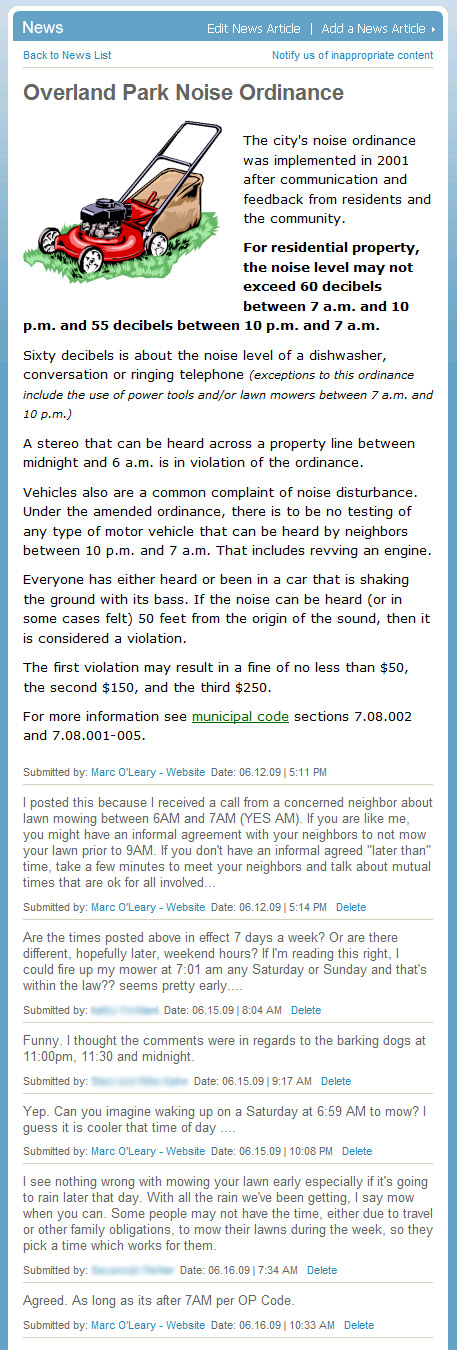
Example #2: This is a great example of what the board typically has to communicate: codes and covenants, rules and regulations, and in this case, city ordiances that everyone needs to follow. I picked this article as an example for a couple of reasons. One, it’s common. Everyone has to post this sort of stuff but Marc does it in a way that is striaght-forward and neighborly. He writes with a tone that says, hey, I’m your neighbor and here are the rules. It’s not just a copy-and-paste job. Second, note the first comment. He wrote it because he got a call from a concerned neighbor. I love this. Marc didn’t just answer the question for the “concerned neighbor”, he answered it for the whole neighborhood. The only thing that he might have been able to do better is have the concerned neighbor write the article for themselves. This isn’t always possible though. Third, look at the comment string. This clearly hit a chord with some people, meaning that it is a problem and people arent’ aware of the rules. So he picked relevant information to post. And finally, note the use of clip art/photos in every post. Nice touch.
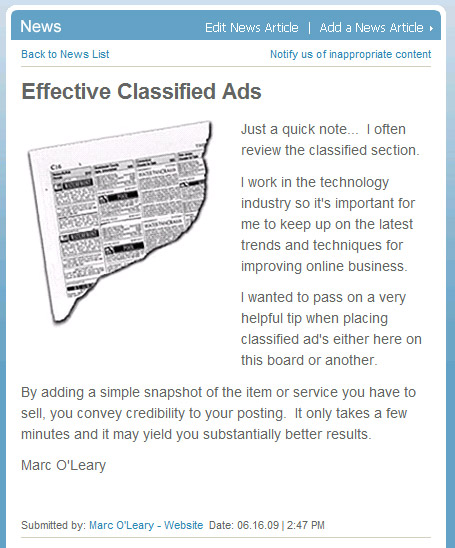
Example #3: This is great. Here’s an example of how you can use the news articles to teach your residents how to make the most of the website.
Example #4:Want more participation? Ask for it. I love Deb’s idea of having a monthly “Chime In”. They are not all shown in the screenshot below but she got 21 comments for this article.
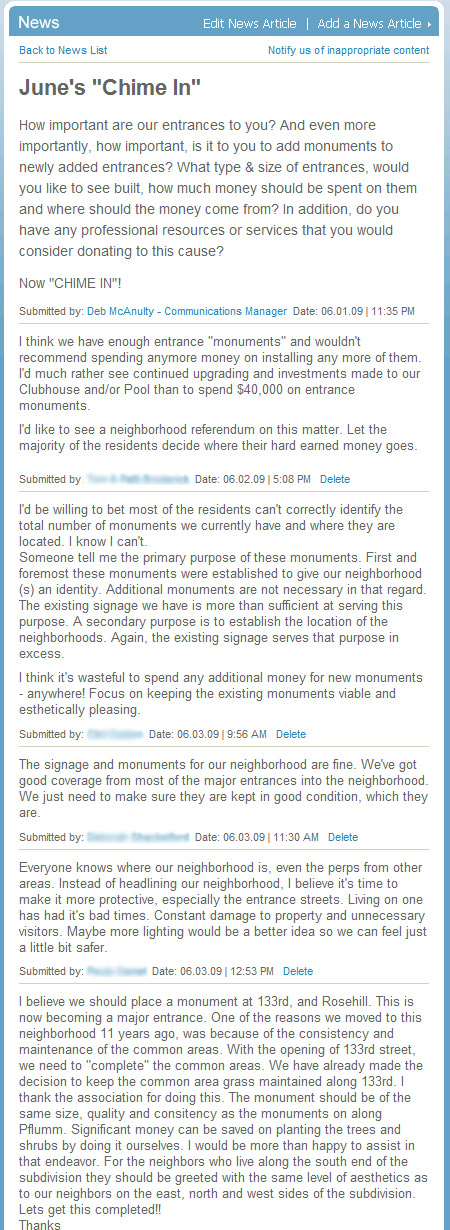
I have a gazillion other examples that are just as good, but I’ll save them for another post. If you’re one of the three people that made it all the way to the bottom of this post, congratulations. You are incredibly intelligent and have a longer than normal attention span.
If you have a suggestion of your own, please post a comment below.
Email Newsletter: Groups
I get a lot of email from customers that ask how we determine what Groups are included in the email newsletter so I thought I’d write a post to clear things up.
Groups are ordered by the number of members that the group has. So the more people that join a group, the higher that group will be in the list. It is setup to reward people who promote their Groups effectively in addition to making it easier to access the most popular Groups.
The second rule is that only first 10 Groups will be displayed. If there are more than 10 groups, you have to go to the “Groups” page on the website to view them.
The screenshot below is of an email newsletter from Spruce Creek South. They have 61 groups listed on their site, but as you can see, only the first 10 are listed. The Group listed at the top has the most members with 64 members. The Group listed second has 40 members, the Group listed third has 20 members, and so on and so forth.
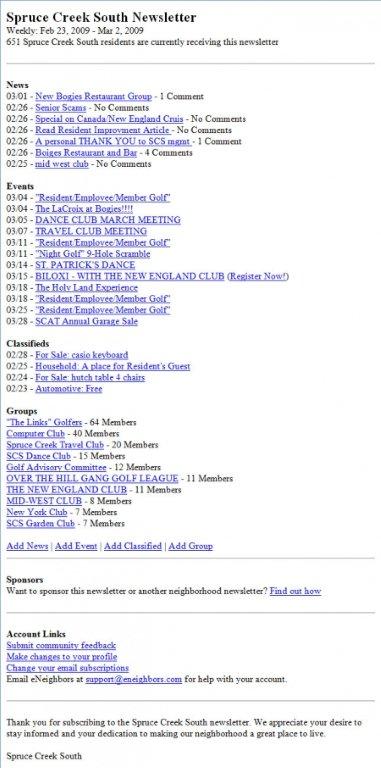
If your Group is not showing up in the email newsletter reach out to your neighbors via email or the next time that you see them and tell them about your Group. This will increase you chances of being included in the email newsletter.
Perhaps the best way to promote your Group is by posting a news article and ask people to join. As shown in the screenshot above, news articles are given the highest visibility at the top of the email and are a very effective way of reaching people in your neighborhood.
When to post a bulletin
The “Bulletin” feature on eNeighbors.com gives administrative users like board members and property managers the ability to send an email to the entire neighborhood immediately.
We built this feature so that board members could have a way to reach their entire neighborhood instantly with time-sensitive information like crime alerts and last minute event changes.
As a registered user of your neighborhood website, you cannot opt-out of receiving bulletins. However, you do have complete control over all other email communication including receiving email from your neighbors, and how frequently you receive the email newsletter.
Since residents cannot opt-out of receiving bulletins it is very important that you, as a board member, do not overuse the bulletins feature and limit using it only when absolutely necessary. My guess is that for every 10 bulletins that are sent, 9 of them should not have been sent and a news article should have been posted instead.
Ask yourself this one question before you send out a bulletin: Can this wait until Monday when the weekly email newsletter goes out? If the answer is yes, then you should post a news article instead. If the answer is no, go ahead and send out the bulletin.
The risk to sending out bulletins to frequently is that you will desensitize your residents to their importance. Bulletins should be treated as very special alerts that command attention when they’re sent so that when you need people’s attention, you can get it.
News articles also offer a more robust WYSIWYG (What You See Is What You Get) editor and residents can comment on them too. Not only that, but you can attach a photo or document to your news article. Bulletins are just text based emails.
If you have any more questions, feel free to comment or email us at support [at] eneighbors [dot] com. (If you’re wondering why I write the email address like this it’s so computers can’t read it and SPAM us. So, assuming you’re human, you can interpret it and type it into your email client.)
National League of Cities on Strong Neighborhoods
I’ve always felt that strong neighborhoods are the key to affecting positive change in a community – especially in city government. My Dad, who is an Overland Park City Councilman, echoes this sentiment.
By my definition, a strong neighborhood is a local community of people that frequently communicate to socialize, pool resources, and solve problems.
eNeighbors helps neighborhoods develop stronger bonds through more efficient communication online and in many cases, our neighborhood websites are used to organize residents around important causes like reducing crime and working with the city to improve new developments.
The National League of Cities recently shared their “Lessons Learned” from community-based initiatives in collaboration with local government. (The full list of lessons is available here.)
Unfortunately, the list doesn’t provide anything actionable, but it is good food for thought. I do want to pick a bone with the last bullet point in their Lessons Learned though:
“The Internet is a powerful new tool for civic engagement. However, there is greater power in building relationships through face-to-face communication. While President Obama had a powerful Internet-connected organization, even more importantly he had a very strong on the ground organization built through individual contacts, house meetings and local actions.”
The above comment is a great example of the hesitation shown by old-line organizations fearful of how the Internet may replace face-to-face communication, but it’s exactly the opposite in my experience: the Internet increases face-to-face communication. The example that I always reference is the Nottingham Forest South Easter Egg Hunt.
The year before our website was in place, the Nottingham Forest South neighborhood relied on a paper flyer to communicate. They announced their annual Easter Egg Hunt in the April newsletter and 25 kids showed up. The next year, the website was in place and an email was sent out – 150 kids attended.
My point is that the Internet fosters face-to-face communication, it doesn’t replace it. And maybe even more importantly, when face-to-face communication is not possible, communication doesn’t stop, it can continue online.
If I’m the National League of Cities, I’m doing everything I can to research what works best in online communication and then encouraging my members to invest money in the online communication tools that make it easier for neighborhoods to interact with their elected representation and affect change. (HINT: A key component to this is real-time communication.)
Neighborhoods truly struggle with establishing good communication channels with their residents. If you send out a paper flyer, it’s costly (first class postage is now $0.44), people throw it away without reading it, and it contains information that is at least 30 days old. If you organize block captains they lose interest, or move away, or are on vacation when you need to get the word out.
But when neighborhoods can establish a real-time online communication channel that is sustainable over time, they can become organized and solve any challenge that they face. They can email and mobilize everyone in seconds, literally, in seconds. They can provide up-to-date and relevant information on a daily or weekly basis and it isn’t dependent on any single person to function so it will be sustainable.
The bottom-line: if you help neighborhoods establish better communication, you will form a stronger neighborhood.
Even simpler: better communication = stronger neighborhoods.
And just for fun: better communication, better communication, better communication.
Western Auto Lofts: Awesome building
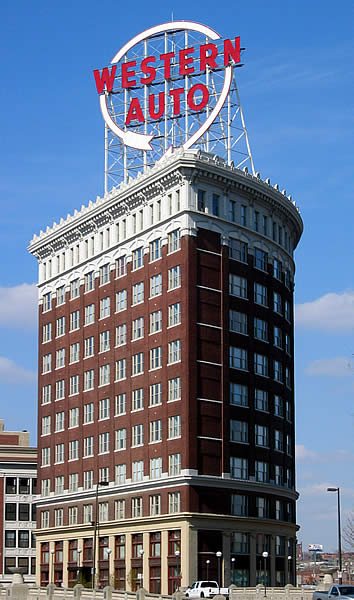
I just setup a new website for a condominium association in Kansas City called “Western Auto Lofts”. They have a really cool building and awesome sign. Photo below:
Content Moderation: An overview and my recommendation
A concern that is shared by nearly all of our HOA boards is that residents will post inappropriate content to their neighborhood website. Board members often struggle with whether or not they should turn on the “content moderation” feature of their website, which allows a board member to review all postings before they are published.
My intention is to address this concern and lay out the benefits and costs of content moderation in this blog post and provide my recommendation for the content moderation setting on your neighborhood website. Please feel free to comment below. I would love the opportunity to hear your thoughts and concerns regarding this topic.
Now, before I dive into this, I want to provide you with a little background.
One integral feature of the eNeighbors website is the ability for every resident in the neighborhood to participate by posting their own news, events, groups, and classifieds. This capability is integral because it promotes participation, communication, activity, and resident interest. It also ensures that the success of the website is not dependent on a single site administrator or board member, but rather, thrives on the participation of each and every resident in a neighborhood.
Without providing the ability for residents to participate, neighborhood websites fail.
By this I mean that they are not used, content becomes stale, and the website is totally worthless as a viable communication channel. (I am not making this statement flippantly, I really mean that neighborhood websites without this ability are 100% worthless.)
So, by providing the ability for residents to actively participate you have established a viable communication channel in your neighborhood, probably for the first time ever. At the very least, you have laid the foundation for one to occur.
But, you have also opened the door for residents to complain and make you (board member) look bad. And therein lies the rub.
On one hand, you want to promote communication and transparency to help your neighborhood flourish. Afterall, communication is the means to all ends in a neighborhood. With communication you can promote social events, organize the neighborhood around community issues, form strong neighborhood watch groups, and so on and so forth.
On the other hand, you know that there are a number of contentious issues facing your neighborhood and that 50% of the neighborhood is on one side of the argument and 50% of the neighborhood is on the other side. If we allow people to communicate online, it’s just going to be a nasty, knock down, drag out fight in an online forum.
So what are you to do?
First, let me validate the concern. You are totally right – there will be postings on your neighborhood website where residents complain, debate, and even argue.
If you don’t believe me, raise dues. In one community, a resident posted a kindly worded news article that totaled 29 words. The title was “Rationale for $60 dues increase”. The post is below.
“We were not able to attend the annual meeting could someone from the HOA Board please post the rationale for raising HOA dues by $60 to $300/year. Thank you.”
The above post received 98 comments from residents that totalled 10,747 words. (For every word they wrote, they produced 370 words in the comment string.)
I would argue that this type of participation is a good thing if not a great thing. For some board members, you might even fall over in your chair if you could elicit this type of participation in your own community, but for others, this type of dialogue may make you uncomfortable.
We are aware of the propensity for neighborhood discussions to become contentious or hotly debated, but this is not something to be avoided. In fact, this is when it is most important to have a healthy conversation. As a result, we have built in parameters that help maintain a healthy discussion so it can occur without becoming unproductive.
Here are the five things that we do to influence appropriate behavior on a community website:
- Residents agree to the Terms of Use when they register for access.
- Residents must register and sign-in to participate. No one can hide their identity. It is attached to every posted action. (example: news article or comment)
- Every news article has a link that states “Notify us of inappropriate content”. This automatically notifies the board, eNeighbors and the property manager.
- The board can suspend any resident violating the terms of use. It is as easy as a mouse click.
- In the rare event it becomes necessary, content moderation can be turned on. This allows a board member to review content before it is published to the website.
Our experience with community content – 12,000 registered users and thousands of posts:
- No articles have ever been taken down because of inappropriate content.
- The “Notify us of inappropriate content” button has been pressed and submitted once; by accident
- No resident in any community has ever been suspended
- Only three neighborhoods use “content moderation”. It has had a negative effect on the community because it discourages participation.
Now that you have an overview of the issue, let’s consider the rest of the story.
What happens if you don’t provide a forum for neighbors to communicate online?– They might create one themselves and you definitely won’t be in control of it. One property manager shared a story with me that their neighborhood board of directors got so sick of the “negative” posts that they shut down the site. Three months later, neighbors had launched their own website, which was public facing. One of the great things about eNeighbors is that everything is behind login, meaning you need a username and password to access the website. We also make sure that only residents are allowed in. This allows the community to have a discussion, contentious or not, without fear of the perception that may be created from the outside looking in. We like to think of ourselves as as online gated community.
Should we, as a board, remove posts that are bad? – Yes and no. Yes, if it is truly bad, as in, it violates the law, the terms of use or is an act of defamation. No, if it just makes you feel bad because the person publishing the comment was “rude” to you or the board. Instead, you should respond as a board member and public official with an even hand. Residents are angry because of how their neighborhood is being run. The only difference is that you are now aware of it because you have an open line of communication with them via the website. Wouldn’t you rather have the opportunity to respond to this type of concern rather than let it stew and grow in the community. Some board members choose not to respond to comments, and this may be an appropriate action given the topic. The website is still serving its purpose by allowing neighbors to voice their concerns.
We don’t want a website that is only used to complain. – Then use it differently. I apologize for my directness, but it’s true. As a board member, you must take an active role in forming the fabric of your community if you want it to be different. Another way to say this is that you don’t want a community that complains all the time. This is not the website’s fault that your community is complaining. If you get rid of the website, the complaining doesn’t go away with it. You just don’t see it anymore, except at your annual meetings. So my suggestion is that as a leader in your community that you help guide the neighborhood towards using the website for suggestions instead of complaints. Discussions instead of debate.
My final recommendation
In conclusion, I strongly recommend that you do NOT turn on content moderation. We have verified that it discourages participation and bottle-necks communication. The purpose of any neighborhood website is to promote communication and by moderating it you are acting as a barrier to the very thing that you want to encourage.
Goodbye, eNeighbors 1.0
When we first started buliding websites for neighborhoods we provided custom designed sites for each customer. We did this for our first 13 neighborhoods, but it quickly became unmanageable, which is why we decided to invest in a robust web application that could scale to support any number of neighborhoods and eNeighbors 2.0 was born.
Today, we say goodbye to the last eNeighbors 1.0 website. Arlington Park was our 4th neighborhood that we put online and they have now upgraded to eNeighbors 2.0. All 13 neighborhoods using our old websites have now completed the upgrade process.
I grabbed a screenshot of the old Arlington Park website just before taking it down today:

Now I get to take down that old server! Thanks to everyone who got us this far. We love you all.
Curry Association Management’s Annual Meeting
We will be presenting at Curry Association Management’s Annual Meeting for their clients.
The meeting is on Tuesday, April 7th at 6:30pm at the Holiday Inn on the Country Club Plaza in Kansas City.
We have a short 10 minute presentation prepared where I’ll provide a quick overview of our services and some tips for generating participation on your neighborhood website. You can also meet with me after the presentation and I can answer any questions that you have in person!
If your HOA is managed by Curry, please be sure to attend, I would love the chance to meet with you.
If that’s not enough, we’re also giving away some gift certificates to Jack Stack BBQ to a few lucky winners.
 eNeighbors Blog